



Choose a comfortable volume
Choose from eleven volume levels using the upper and lower ends of the button.

Use the buttons on Axis to change volume and listening programs. You do not need the app.
Hear conversations at a volume you choose
Follow everyday conversation with less background noise, and adjust the sound directly on your hearing aids.
Axis rechargeable over-the-counter hearing aids have a dark-gray body that sits behind your ear. A thin wire connects it to a small speaker in your ear canal. Directional microphones pick up sound, noise reduction reduces background noise, and feedback suppression reduces whistling. Choose from four listening programs: Conversation, Restaurant, Outdoor and Music. You can adjust eleven volume levels using the buttons or the optional myiHEAR app. Bluetooth lets you adjust settings in the app; Axis does not play calls or music from your phone.
Left and right iHEAR Axis hearing aids, assorted ear domes, cleaning brush, charging case, charging cable and power adapter.
Use the button on each hearing aid to change volume and listening programs. Press the upper or lower end to make an adjustment.
 Upper endLower end
Choose from eleven volume levels using the upper and lower ends of the button.
Hold the upper end of the button to move to the next listening program. There are four programs to choose from.
Press the upper end to increase volume or the lower end to decrease it.
Hold the upper end to change listening programs.
Axis reduces background noise and sends sound through a small speaker in your ear.
Directional microphonesDigital sound processingIn-canal receiverDirectional microphones capture speech and surrounding sound through the openings on the hearing-aid body.
Digital noise reduction reduces background sound. Feedback suppression controls unwanted whistling.
A small speaker sends sound into your ear canal at the volume you choose.
Axis combines volume adjustment with noise controls and selectable listening programs. A volume-only amplifier changes the overall level.
Directional microphones, digital noise reduction and feedback suppression.
Makes sound louder without reducing noise or whistling.
Four selectable programs: Conversation, Restaurant, Outdoor and Music.
One listening setting with volume adjustment.
Adjust eight ranges of sound separately for each ear in the optional myiHEAR app.
Adjusts overall volume, without separate controls for low and high sounds.
Choose a program for conversation at home, a busy restaurant, time outside or music playing around you.

Use this setting for everyday conversation.

Choose this program for a busy dining room.

Select this setting for listening outside.

Use this setting for music playing around you.
The optional myiHEAR app lets you adjust eight ranges of sound, from low to high, separately for your left and right ears.
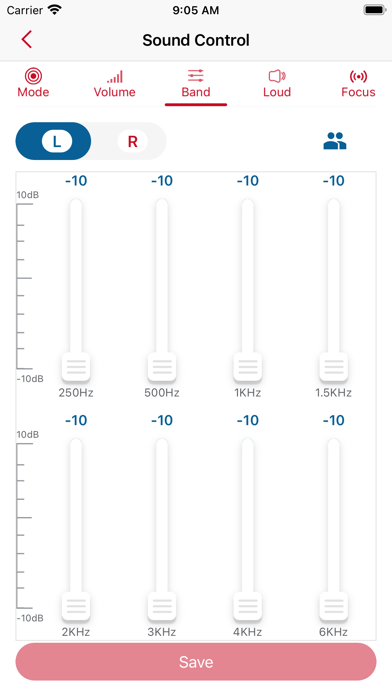
Adjust eight ranges of sound, from low to high, separately for each ear.
Use the app to adjust noise reduction and the direction the microphones pick up sound from.
The button on each hearing aid changes volume and listening programs. You do not need the app.
Axis sits behind your ear, with a small speaker and soft ear tip in your ear canal.
 Behind-ear bodyFine wireIn-canal receiver
A thin wire connects the hearing aid behind your ear to the small speaker in your ear canal.
Choose a comfortable fit from the included soft ear tips, also called domes.
The case stores both hearing aids and can recharge them without being plugged in.

A full charge takes approximately two hours.
Use Axis for up to 24 hours on a full charge. Battery life depends on how you use it.
A fully charged case can recharge the hearing aids up to three more times away from an outlet.
Get help with fit and listening settings. Our team can answer your questions as you get familiar with Axis.
hello@heardirectclub.com
Get help choosing ear tips and positioning your hearing aids.
Ask about the listening programs, volume controls or optional myiHEAR app.
Try the fit and sound in your everyday conversations before deciding whether Axis suits you.
You have 100 days from the date your hearing aids arrive.
There is no required minimum trial period before requesting a return.
Request return approval within the return window. You pay the return shipping fees.
Returns require prior approval. Refunds go to the original payment method after the return is received and inspected.
Yes. The physical buttons control volume and listening programs. The optional myiHEAR app provides finer adjustments, including separate settings for each ear.
Press the upper end for one second to raise volume, or the lower end for one second to reduce it. Hold the upper end for three seconds to move to the next program. Holding the lower end for three seconds switches power on or off.
Axis uses Bluetooth for app control only. For direct phone audio streaming, choose Matrix in the behind-ear style or Linx in the earbud style.
Use the Music program to listen to music in your surroundings. Axis does not stream audio from a phone.
Choose Axis if you prefer hearing aids that sit behind your ears, with small speakers in your ear canals and buttons on the hearing aids. Linx looks like wireless earbuds and also plays calls and music from your phone. Axis uses Bluetooth only to adjust settings in the app.
Axis uses rechargeable batteries. Place the hearing aids in the included case to recharge them rather than inserting disposable hearing-aid batteries.
Try the included domes and adjust the volume and listening program. If Axis is not right for you, request return approval from hello@heardirectclub.com within 100 days of delivery. You pay the return shipping fees.
For adults 18+ with perceived mild-to-moderate hearing loss. No prescription is required. OTC hearing aids do not restore normal hearing or treat the cause of hearing loss. Seek professional evaluation before use for sudden or one-sided hearing changes, ear pain or drainage, substantial earwax, ear deformity or dizziness.